


SBB Mobile
3.4345.00 Reviews
App Specs
- Version
- 12.56.1.189.master
- Updated On
- License
- Free
- Downloads
- 5,000,000+
- Developer
- Schweizerische Bundesbahnen SBB
- Categories
- Maps & Navigation
- Platform
- Android, iOS
Screenshots

 Analysis by AppCompare
Sharing a phone for a quick trip search sounds simple until one person needs a route while another is trying to buy a ticket. I find SBB Mobile most useful when it becomes part of a household’s travel routine: one person can check a connection, then pass the phone over so someone else can confirm the destination or departure time. That practical handoff matters more than it may seem when everyone is getting out the door.
One phone, several kinds of journeys
For a family heading into town, the app can help compare public-transport connections before anyone leaves home. A parent might check the train and onward bus, while another traveller confirms the stop where they need to get off. On a day out, that shared planning can reduce the usual back-and-forth about whether the group has enough time to make a connection.
I would still treat a shared screen as a shared workspace, not a shared personal account. Whoever is buying a ticket should check the passenger and journey details carefully before completing the purchase. A saved search or favorite can make a repeated route easier to find, but it is worth confirming that it is still the right trip rather than relying on an old choice automatically.
Keep the handoff clear
A useful household habit is to agree who is responsible for each part of the journey. One person can look up the route, another can check the departure time, and the traveller carrying the phone can keep an eye on updates. This avoids assuming that everyone has seen a notification or knows which connection the group chose.
That arrangement is also a reason not to pass a phone around while someone is rushing through ticket purchase. I’d pause long enough to check the route, time, and ticket details together. If several people travel separately, each person should know how to access the information and ticket they need rather than depending on the phone-holder being available at the platform.
What younger travellers need to know
The app is rated for Everyone, which makes it suitable in age terms for a broad audience, but that does not mean every travel decision should be left to a child. I would show a younger traveller how to read the destination, departure time, and platform information, then agree what to do if the plan changes. For a first independent journey, a clear route and a reachable adult matter as much as the app itself.
When an adult is handling a purchase, the child can still take part by checking the route and recognizing the arrival stop. That is a sensible way to build confidence without assuming the app provides family supervision or account-sharing controls. In a household with different travel needs, keeping responsibility for purchases and last-minute changes explicit prevents confusion.
Worth Reading Before You Choose

EA SPORTS FC Mobile 26 Is a Bigger Football Game, but It Takes Time

Flipboard Shows What News Apps Must Do Beyond the Feed

Switching to Android Auto Means Rethinking Your Driving Routine

Google Calendar Makes a Crowded Week Easier to Manage

Ludo King Makes the Most of the Minutes Between Plans

Baby Panda World Brings Quick Play to Modern Phones, but Its Game Library Feels Busy
Your Travel Companion
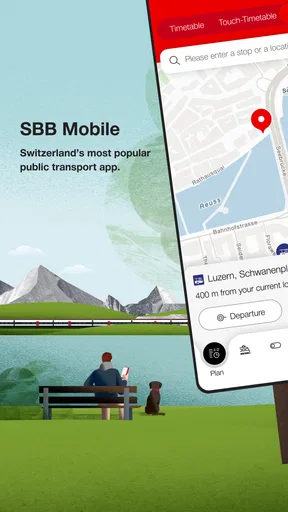
SBB Mobile is essentially your all-in-one tool for navigating the Swiss travel system. From checking train schedules to buying tickets, it’s got pretty much everything you need to ensure a smooth journey. And the best part? It fits right in your pocket.
Features That Make Life Easier
The first thing that really caught my attention was how user-friendly the interface is. You don’t need to be a tech wizard to get your head around it. Everything is laid out in a way that just makes sense.
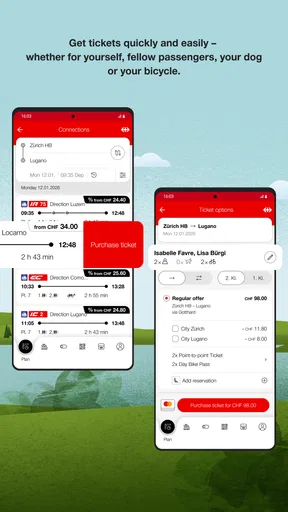
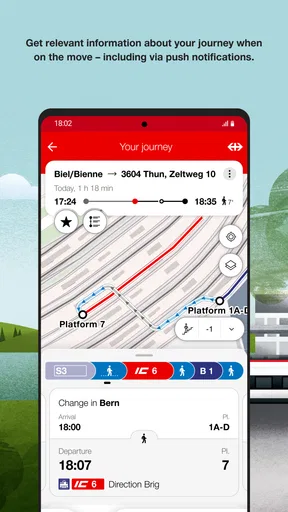
The app lets you search for connections easily. You just enter your departure and arrival stations, and boom, you’ve got a list of options at your fingertips. It even shows you the platform numbers, so no more last-minute dashes through the station!
Another nifty feature is the real-time updates. Train delays can be a real pain, but with SBB Mobile, you’re always in the loop. It sends notifications straight to your phone, so you know exactly what's happening with your journey.
Buying Tickets is a Breeze
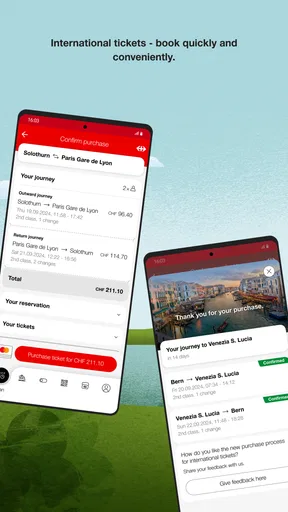
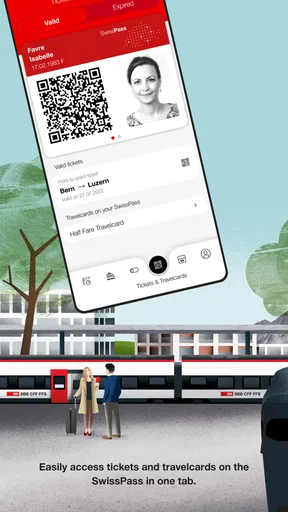
I’m not a fan of queuing, and I’m sure you’re not either. Thankfully, the app allows you to purchase tickets directly. You can pay with various options, and the tickets are saved in the app, so no more fumbling with paper tickets or worrying about losing them.
Plus, if you’re someone who travels regularly, it’s worth checking out their travelcards and half-fare options. It’s all in there, and it definitely helps save a few francs.
Plan Your Journey Like a Pro
One feature I found super helpful is the journey planner. It’s not just about trains; you can plan your entire trip, including buses and trams. The integrated map is a lifesaver for those of us who are, let’s say, geographically challenged.
And if you’re into biking, the app even shows you the bike-friendly routes. It’s pretty neat how they’ve thought of just about everything.
Personalize Your Experience
Customization is key, and this app lets you tailor your travel preferences. Whether you want to avoid certain routes or prefer a specific type of seat, you can set it all up in the app. It’s like having a personal travel assistant.
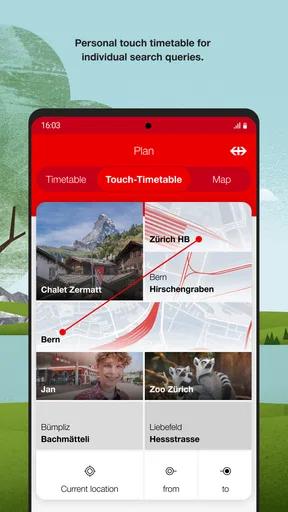
The app also remembers your previous searches and favorites, which is great for those regular trips. It’s all about making things as convenient as possible.
Choosing it over other travel apps
As a public transport app from Schweizerische Bundesbahnen SBB, this is the option I would reach for first when the trip depends on Swiss rail and connecting local transport. A general maps app is handy for walking directions and getting a broad sense of where a place is, but I prefer a transport-focused planner when I need a sequence of departures, platforms, and transfers in one journey. For a trip centered on driving, or for broad sightseeing directions without a public-transport focus, a general map may be the better fit.
The distinction matters most when a trip crosses modes. Rather than planning a train in one place and then separately guessing how to continue by bus or tram, I can use the journey planner to think through the route as a connected whole. I still check the proposed connection against the actual situation at the station, especially when timing is tight: a route suggestion helps me plan, but it cannot remove the need to pay attention to signs and changes around me.
A small routine that prevents mistakes
For a repeat commute, I’d save the common search or favorite, then check the date and departure time before acting on it. Familiar routes are exactly where people can become careless: a remembered trip can feel correct even when the day’s plan is different. For a new destination, I’d search from the station or stop I will actually use, not just the nearest place name that comes to mind.
Before leaving, I’d also open the trip details once more and make sure the transfer is realistic for the people travelling. Someone carrying luggage, travelling with a child, or unfamiliar with the station may need more breathing room than a confident regular commuter. That is a useful trade-off: the app can make the itinerary clear, but I still have to decide whether its pace suits my group.
Tickets need a moment of attention
Buying on a phone is convenient, but it shifts the final check from a ticket counter to the screen. I would verify the journey and the relevant ticket choice before paying, then make sure the ticket is available in the app before joining the platform crowd. That quick pause is especially worthwhile when one person is purchasing for a shared outing, because the buyer should not assume that a ticket intended for one traveller automatically covers everyone.
The app is free, which makes it easy to try without committing to a purchase, while tickets and travel products remain separate decisions made inside the travel experience. Its current version is 12.52.2.176.master, and it supports devices running Android 8.0 or later. I’d keep the app updated through the usual device process so I can use the current release, but I would not treat an installed journey plan as a replacement for checking live travel details on the day.
Where it earns a place in the routine
For people who regularly use trains, buses, or trams in Switzerland, this is the sort of tool I’d keep close at hand rather than opening only for holidays. Its five million-plus installs suggest it has become familiar to many travellers, although popularity alone does not tell me whether it suits a particular person. The average rating is 3.4 from around 33,000 ratings, so I would not assume every user finds the experience effortless; my own recommendation depends on whether Swiss public transport is central to your plans.
The friction I would watch for is not that planning is complicated, but that a phone can become the single point of responsibility. A low battery, a missed notification, or a companion who has not seen the selected route can turn a convenient setup into a scramble. For a group, I’d say the important departure and meeting details aloud or share them through the group’s normal communication method, rather than expecting everyone to discover them on one person’s screen.
Who I would recommend it to
I’d recommend it to residents who already know they rely on Swiss public transport, visitors who want one place to plan train and local-transport connections, and households coordinating a shared outing. It is particularly useful when the route has several legs and a missed change would cause confusion. The age rating is Everyone, but adults should still guide children through purchases and changing travel plans rather than treating an age label as a substitute for supervision.
I’d skip it as a main tool if your journeys are mostly by car, if you only need a simple street map, or if you are looking for a single app to coordinate a household’s accounts and responsibilities. Its job is travel planning and related ticketing, not family organization. For someone who mainly needs walking directions, a general map app may be quicker; for a Swiss public-transport trip, I would rather start here and use a map only where the route needs extra street-level context.
Final Thoughts
Overall, SBB Mobile is a fantastic app for anyone navigating the Swiss public transport system. It’s packed with features that genuinely make travel easier and more efficient. Whether you’re a local or a tourist, it’s an indispensable tool worth having on your phone.
If you haven’t checked it out yet, give it a go. It might just change the way you travel around Switzerland. Happy travels!
A household verdict
For a household, I see it as a strong shared planning aid, not a substitute for clear communication or each traveller understanding their own trip. It can help everyone agree on a route and make a ticket purchase less dependent on queues, while saved searches can reduce repetitive planning. The best results come from naming who is checking, who is paying, and who is carrying the ticket information before the group sets off.
As a Maps & Navigation app, it has a clear purpose and a sensible place beside general mapping tools. Schweizerische Bundesbahnen SBB has built an option I would choose for Swiss public transport, with a free entry point and an Everyone age rating. My recommendation is enthusiastic for rail-and-transit users, cautious for people expecting a universal map or household-account manager, and practical for anyone willing to double-check the details that matter before boarding.
Pros
- Intuitive user interface for smooth navigation.
- Real-time updates on train schedules.
- Easy ticket booking and management.
- Integration with SwissPass for seamless travel.
- Supports multiple languages for accessibility.
Cons
- Occasional glitches in ticket purchase feature.
- Limited offline functionality for journey planning.
- High battery usage during prolonged sessions.
- Requires frequent updates for optimal performance.
- Some users report slow customer support response.
FAQs for SBB Mobile
What features does SBB Mobile offer for travelers?
SBB Mobile provides a comprehensive suite of features designed to enhance the travel experience. Users can easily access real-time schedules, purchase tickets, and receive updates on delays or platform changes. The app also offers personalized travel itineraries and supports multiple languages, ensuring a seamless journey for both local and international commuters.
Is SBB Mobile available for both Android and iOS devices?
Yes, SBB Mobile is available for both Android and iOS platforms. The app can be downloaded from the Google Play Store for Android devices and the Apple App Store for iOS devices. The application is optimized for smooth performance across various device models and operating systems.
How secure is the payment process on SBB Mobile?
SBB Mobile prioritizes user security, employing advanced encryption methods to protect personal and payment information. The app supports multiple secure payment options, including credit/debit cards and mobile wallets. Users can confidently purchase tickets, knowing that their transactions are safeguarded against unauthorized access and fraud.
Can I use SBB Mobile without an internet connection?
While SBB Mobile requires an internet connection for certain features such as purchasing tickets and receiving real-time updates, some functionalities, like viewing previously downloaded schedules and tickets, are accessible offline. This ensures that users can still access essential travel information even in areas with limited connectivity.
What should I do if I encounter issues with SBB Mobile?
If you experience any issues with SBB Mobile, the app provides a support section with FAQs and troubleshooting tips. For further assistance, users can contact customer support directly through the app. Regular updates are also released to address bugs and improve overall performance, ensuring a reliable user experience.


